Let's know today how to download videos from Youtube, 2020 Youtube from mobile is the second largest search engine in the world where millions of videos are searched every day. At the same time, Google is the number one search engine in the world, although you would know that YouTube is a product that Google bought in 2007, since then YouTube has joined Google and remains the world's number 1 online video site. If you run the internet, then you will also be running Youtube because here you get all kinds of videos.

Today, Youtube is also emerging as a business because millions of people are earning crores of rupees from YouTube, talk about India, so many people are getting attracted to YouTube due to being unemployed. This is an online video site where you get paid for uploading videos and this is why YouTube continues to grow.
In this site you get all kinds of videos, so you will also want to download some videos which you can later show offline to your friends. Data is spent when you watch YouTube videos online. If you watch any video again, then internet data will also be spent again, in which case you can download the video.
You can see it many times, it will not cost you any data. So how to download Youtube videos, you will want to know that today we are going to tell you a very simple way to download videos from YouTube. You can use this method in Google's Chrome browser.
How to download videos from youtube
If you have a computer, follow these steps. First of all, you have to open Chrome browser, here you have to search Youtube and open its website. After this, play any video you want to download.

When your video starts playing, you will see above the video, then some such URL will appear. Every video is a different URL, from this URL you can play that video online anywhere.

WWW you need to download YouTube videos. Next, add SS and click on the URL with the same SS, after this a website named savefrom.net will open here.
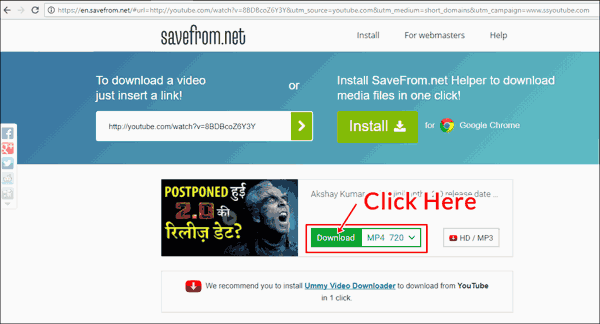
In this website you can download your YouTube videos, here you are given the option to download the video according to the quality of the video.
The above mentioned method works for computer but if you want to download youtube videos in mobile, then you have to follow other steps, although youtube also has the official option of saving videos, but you cannot save all videos from it Apart from this, they are present only in the video app you download, they are not saved in your mobile phone gallery, in such a way, for mobile A. You have to follow the step below
1. First of all go to your Chrome browser and search for Snaptube Download there. Many websites will come in its result, you have to download Snaptube from any website, then install it in your phone and open it.

2. Now play any video you want to download in your Youtube app. After playing the video, you will see the option to share below, click on it.
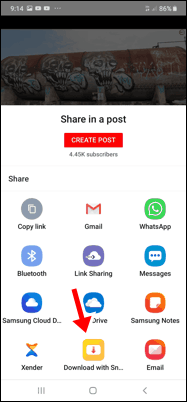
3. After this, you will see many options in the new page, you have to click on Download With Snaptube, seen at the bottom.
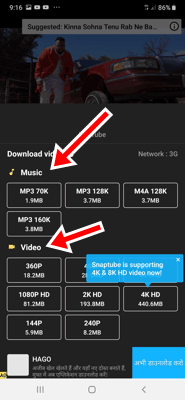
4. Here you will get options in different quality of MP3 audio file and video format, you can download videos in any quality of your choice. After clicking on the format, you have to write the name of the song and click on the download, your video will be saved in the gallery.
So now you know about how to download Youtube videos from mobile. Almost everyone uses this method in computer because here you do not need any different software, here only you have to search by writing SS in the URL which will open the website, from there you can watch the video from low quality to high quality Can also download. At the same time, for mobile users, you have to download an app named Snaptube, so hopefully, you will like this information of downloading videos from Youtube.
Also see: